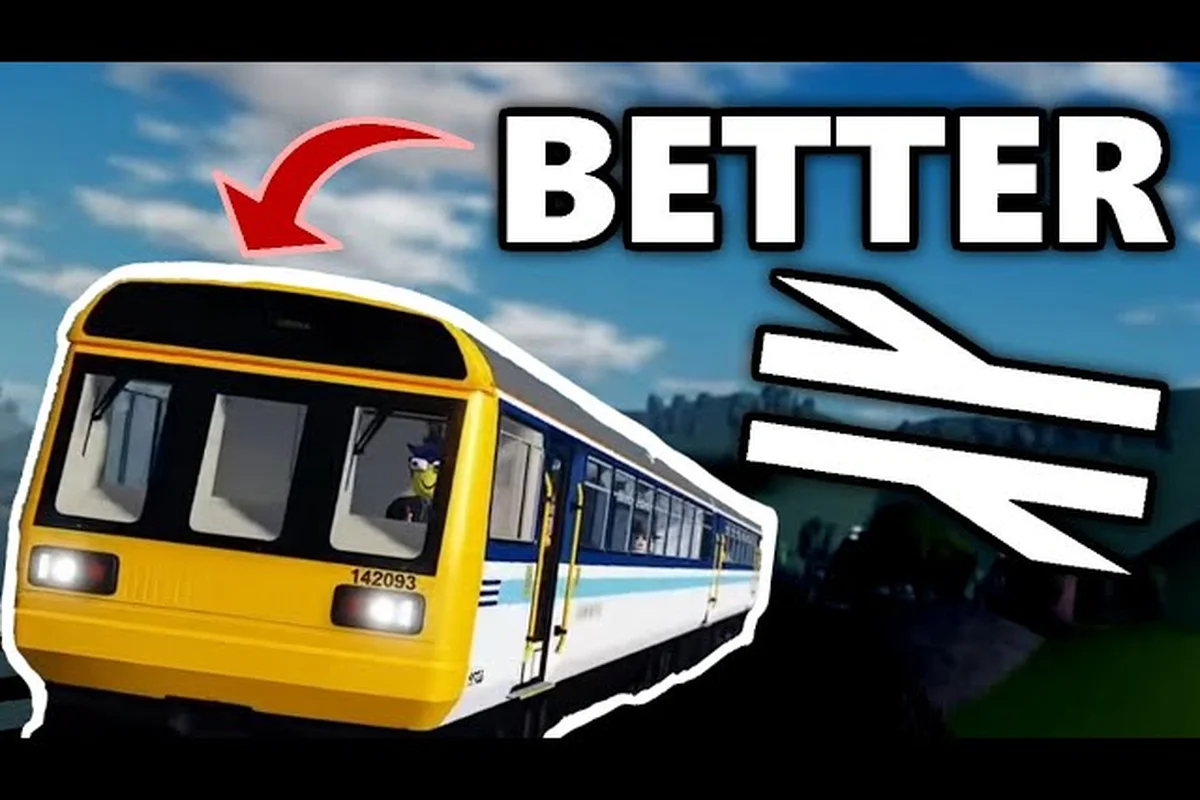
British Railway Roblox gameplay has evolved significantly with the V1.4.2 "The Western Update" released on August 8, 2026, bringing the iconic Class 43 HST to the new Pencarn extension. Whether you're climbing into the driver's cab for the first time or learning the guard's responsibilities, understanding the core mechanics separates smooth operations from chaotic delays. This guide breaks down the essential driving physics, guard mode procedures, and ticket checking workflow that define the British Railway experience on Roblox.
The game, developed by Fourth Rail, has amassed over 35.9 million visits with roughly 87% positive ratings, making it one of the most active train simulation experiences on the platform. With a 45-player server cap, every role matters — and knowing how to execute yours properly keeps the network flowing. Let's examine what makes British Railway Roblox gameplay tick, starting with the fundamentals every player needs before their first departure.
According to the official British Railway Roblox page, the game's core loop centers on players purchasing and upgrading trains to transport passengers across a detailed UK-inspired map, with progression tied to completing routes and earning in-game currency.
According to the official British Railway Roblox game page, the core gameplay loop revolves around driving realistic trains across a detailed map of the UK, with a focus on authentic acceleration, braking, and signal mechanics that reward careful route planning.
British Railway Roblox Gameplay: Core Driving Mechanics
Mastering how to drive in British Railway starts with understanding the notch-based power system that mimics real diesel and electric traction. Unlike arcade-style train games where you simply hold forward, British Railway requires you to manage acceleration, braking distance, and signal adherence. The Class 43 HST and Class 175 each handle differently, which means you cannot rely on a single driving style across the fleet.
The throttle notches range from neutral to full power, and each notch increment changes acceleration rates dramatically. When departing a station, you should apply power gradually rather than slamming the controller to maximum, because wheel slip and passenger discomfort penalties apply if you accelerate too aggressively. The dynamic brake system works in reverse — applying higher brake notches increases deceleration, but using it at high speed can cause jerky stops that trigger the safety systems.
Understanding the Class 43 HST Power Curve
The HST power band sits in the middle notches for optimal performance. Community testing suggests that notch 3 to 4 provides the best balance between acceleration and fuel efficiency on flat sections, while notch 5 becomes necessary for the gradients around Pencarn. The speed limiter activates automatically when you exceed the route's posted limit, which means you cannot simply run at full power everywhere without consequences.
| Train Class | Max Speed (mph) | Acceleration Notch | Brake Distance (approx) | Best Use Case |
|---|---|---|---|---|
| Class 43 HST | 125 | 3-4 | 800m from 100mph | Express services |
| Class 175 | 100 | 2-3 | 600m from 90mph | Local stopping services |
| Class 66 (freight) | 75 | 4-5 | 900m from 70mph | Cargo operations |
The brake distance table above comes from player-reported measurements on the mainline, and it highlights why reading signals early matters. If you pass a green signal at speed and the next one shows double yellow, you have roughly 1,200 meters to reduce from line speed to the restriction — which requires braking at least two notches before the signal. Players who brake late often trigger the TPWS emergency brake, which locks the train for 30 seconds and disrupts the entire service pattern.
Signal Reading and Speed Restrictions
British Railway Roblox driving mechanics include a simplified version of UK colour-light signalling. The sequence runs green (clear), double yellow (preliminary caution), single yellow (caution), and red (stop). Each aspect change requires a specific response, and the AWS warning sounds in the cab when you approach a caution signal, giving you an audible cue to start braking.
| Signal Aspect | Meaning | Required Action | Speed Limit |
|---|---|---|---|
| Green | Clear ahead | Maintain current speed | Line speed |
| Double Yellow | Next signal may be caution | Begin braking | 60 mph |
| Single Yellow | Next signal is red | Reduce to 30 mph | 30 mph |
| Red | Stop before signal | Full brake application | 0 mph |
The speed restriction table shows the maximum permissible speed past each signal aspect, and these values are enforced by the game's physics engine. Exceeding them triggers a penalty application that records against your driver score. Repeated violations can lead to temporary removal from driving duties, so learning to read the sequence of signals — not just the immediate one — is a core skill for British Railway Roblox gameplay.
Guard Mode: How to Guard in British Railway 1.4
The guard role underwent a major overhaul in version 1.4, and knowing how to guard in British Railway 1.4 now involves door control, dispatch procedures, and ticket verification working in sequence. The guard operates from the rear cab or vestibule area, depending on the train class, and must coordinate with the driver through the communication system.
The dispatch sequence begins when the train arrives at a station. The guard must first check that all passengers have alighted and boarded, then verify the platform-side doors are clear before closing them. The door control panel shows each door's status with green (closed and locked), amber (closing), and red (open or fault). You cannot dispatch the train until every door shows green, and forcing the departure with doors open triggers a safety violation.
Door Control and Dispatch Procedure
The guard mode interface provides a step-by-step checklist that updates in real time. First, you press the door enable button to unlock the doors, which allows passengers to board. After the boarding timer expires — typically 20 seconds at busy stations — you press door close, and the system begins cycling through each door individually. If any door detects an obstruction, it reopens automatically, and you must clear the obstruction before attempting closure again.
-
Step 1: Press door enable when the train stops and the platform aligns
-
Step 2: Monitor the boarding timer and passenger flow through the CCTV feed
-
Step 3: Press door close and watch for fault indicators on the door panel
-
Step 4: Confirm all doors show green, then press dispatch signal
-
Step 5: Give the driver the right-away signal using the buzzer
The dispatch buzzer sends a two-tone signal to the driver's cab, confirming that doors are secure and the train may depart. Drivers who receive this signal can proceed with confidence, while those who depart without it risk a platform-side incident that damages their reputation score. The coordination between guard and driver is the heart of British Railway Roblox gameplay, and servers with active guards consistently run smoother services than those relying on automatic dispatch.
Guard Mode Communication Protocols
Effective guard mode requires clear communication through the in-game radio system. The guard can send preset messages to the driver, including "doors closed," "station clear," and "emergency stop requested." These messages appear as on-screen notifications in the driver's cab, reducing the need for voice chat coordination. The emergency stop request function is particularly important — if the guard spots a hazard on the platform or track, triggering this immediately applies the train's emergency brakes.
The guard's safety responsibilities extend beyond doors and dispatch. You must also monitor the CCTV feeds for each carriage, watching for suspicious activity or passengers blocking doorways. The ticket checking function ties directly into this monitoring role, because you can identify fare evaders and address them before they cause issues. For a deeper breakdown of the ticket verification workflow, the British Railway ticket checking guide covers the scanning mechanics and penalty fare system in detail.
British Railway Roblox Ticket Checking Workflow
Ticket checking in British Railway Roblox gameplay operates through a handheld scanner that the guard carries. When you approach a passenger and activate the scanner, it displays their ticket status: valid, expired, or missing. The ticket types include single journey, day return, and season pass, each with different validity periods that the scanner tracks automatically.
The scanning process requires you to be within two meters of the passenger and facing them directly. The scanner emits a confirmation tone — a single beep for valid tickets, a double beep for expired ones, and a long buzz for missing tickets. Passengers with invalid tickets enter a fare evasion state, which gives you the option to issue a penalty fare or request they leave at the next station.
| Ticket Type | Validity | Scan Result | Action Required |
|---|---|---|---|
| Single Journey | One trip only | Valid until alighting | None |
| Day Return | 24 hours | Valid within period | None |
| Season Pass | 7 days | Valid until expiry date | None |
| Expired Pass | Past validity | Double beep | Penalty fare option |
| No Ticket | N/A | Long buzz | Penalty fare or eject |
The penalty fare system issues a fine that appears on the passenger's screen, and repeated offenders accumulate a ban timer that prevents them from boarding trains for a set duration. This enforcement loop keeps the economy balanced, because fare evasion reduces the revenue that funds new train purchases and route extensions. Players who skip ticket checking entirely hurt the server's progression, which is why the guard role carries real responsibility.
Handling Difficult Passengers
Not every passenger accepts a penalty fare quietly. Some will attempt to run through the train to avoid the fine, triggering a chase sequence that requires you to catch them before they reach the next carriage. The movement speed of the guard is slightly faster than passengers, but door transitions slow you down, so positioning matters. Standing near the carriage connection gives you the best coverage for intercepting runners.
The ejection mechanic removes a passenger from the train at the next station, but it requires the train to be stopped and the platform-side doors open. You cannot eject passengers while the train is moving, which means you must coordinate with the driver through the radio to arrange a stop. The British Railway guard controls guide explains the full button mapping for these interactions, including the eject command and the penalty fare menu.
British Railway Roblox Gameplay: Advanced Driving Techniques
Once you understand the basics of how to drive in British Railway, advanced techniques can dramatically improve your punctuality score and fuel efficiency. The coasting technique involves cutting power before a downhill section and letting gravity maintain speed, which reduces fuel consumption by up to 15% on routes with significant elevation changes. The Pencarn extension includes several viaducts and gradients that reward this approach.
The brake blending technique combines dynamic brakes with the air brake system for smoother stops. Instead of applying full dynamic brake and letting the train jerk to a halt, you apply two notches of dynamic brake first, then add the air brake in the final 200 meters. This produces a gradual deceleration curve that passengers barely feel, improving your comfort score and reducing complaints.
Managing Timetables and Delays
British Railway Roblox gameplay includes a timetable system that tracks your adherence to scheduled departure and arrival times. Each service has a window of +/- 2 minutes before it counts as delayed, and consistent delays reduce your driver rating. The recovery time built into the timetable allows you to make up small delays by running slightly above the speed limit where signals permit, but only if you know the route's signal spacing well.
| Delay Duration | Rating Impact | Recovery Strategy |
|---|---|---|
| 0-2 minutes | None | Normal operation |
| 2-5 minutes | Minor reduction | Increase speed by 5 mph where safe |
| 5-10 minutes | Moderate reduction | Skip station dwell time if clear |
| 10+ minutes | Major reduction | Request priority from dispatcher |
The dispatcher role can grant priority to a delayed service, which holds other trains at signals to let you pass. This requires active coordination, and the dispatcher will only prioritize your train if the delay is not your fault. Building a reputation for reliable driving makes dispatchers more willing to help when you genuinely need it, which is why consistent performance matters beyond just your own score.
Linking Rolling Stock: Coupling Basics
Freight services add another layer to British Railway Roblox gameplay, requiring you to couple and uncouple wagons at designated yards. The coupling mechanism uses a magnetic buffer system that engages when you approach a wagon at under 5 mph with the coupler deployed. The uncoupling process requires you to stop, deploy the uncoupling tool, and then pull away slowly to leave the wagons behind.
The Class 66 locomotive handles freight duties, and its traction control system differs from passenger trains. The lower power-to-weight ratio means you need to plan braking much earlier, especially on the gradients around the Pencarn freight yard. The British Railway uncoupling guide covers the full coupling and railtour procedures, including the camera positioning that helps you align with wagons accurately.
British Railway Roblox Gameplay: Role Selection and Progression
Choosing the right role for your skill level shapes your British Railway Roblox gameplay experience. The passenger role is the easiest entry point, letting you explore the network and learn station layouts without operational responsibility. The driver role requires the most technical skill, while guard mode offers a middle ground that combines passenger interaction with safety procedures.
The progression system tracks your experience across all roles, and reaching certain milestones unlocks prestige liveries and exclusive routes. The driver progression requires completing 50 successful services, while the guard progression demands 100 ticket checks and 20 clean dispatches. These requirements ensure that players master the fundamentals before accessing advanced content.
| Role | Difficulty | Starting Requirements | Progression Reward |
|---|---|---|---|
| Passenger | Beginner | None | Route knowledge |
| Guard | Intermediate | Complete passenger tutorial | Guard uniform variants |
| Driver | Advanced | Pass driving test | HST liveries |
| Dispatcher | Intermediate | 10 hours total playtime | Control room access |
The driving test that unlocks the driver role includes a signal recognition section, a braking distance assessment, and a station stop accuracy check. You must score at least 80% to pass, and the test can be retaken after a 24-hour cooldown. The beginner guide for British Railway Roblox covers the test format in detail, including the specific speed thresholds you need to hit for each section.
Optimizing Your Gameplay Experience
Performance optimization matters for smooth British Railway Roblox gameplay, especially on the Pencarn extension with its detailed scenery. The graphics settings menu offers a performance mode that reduces particle effects and shadow quality while maintaining the core visual fidelity of the trains. Players on lower-end devices should enable this mode to avoid frame rate drops during busy station operations.
The camera controls also affect your driving precision. The external camera gives you a full view of the train and platform, which helps with station stop accuracy, while the cab camera provides the immersive view needed for signal spotting. Most experienced drivers switch between these views — using the cab camera on open stretches and the external camera for station approaches.
Frequently Asked Questions
What is the best train for beginners in British Railway Roblox gameplay?
The Class 175 is the best starting train because its lower top speed and shorter brake distance make it more forgiving. The acceleration curve is gentler, giving you more time to react to signals and station approaches. Master the Class 175 before attempting the Class 43 HST on express services.
How do I check tickets as a guard in British Railway?
Equip the handheld scanner from your inventory, then approach passengers within two meters and activate the scan. A single beep means valid, double beep means expired, and a long buzz means no ticket. Issue penalty fares for invalid tickets or eject repeat offenders at the next station.
What happens if I miss a red signal while driving?
Missing a red signal triggers the TPWS emergency brake, which stops the train immediately and locks the controls for 30 seconds. Your driver rating takes a significant hit, and repeated violations can temporarily revoke your driving privileges. Always read signal sequences ahead to avoid this penalty.
Can I play as a guard and driver in the same session?
Yes, you can switch roles between services, but not mid-service. Complete your current run, then use the role selection menu at the spawn point to change. Each role has separate progression tracking, so switching regularly helps you unlock rewards across all role categories.
Does British Railway Roblox gameplay support mobile devices?
Yes, the game runs on PC, mobile, and console platforms. Mobile players get touch controls for throttle and brake, while console players use controller mappings. The driving mechanics feel slightly different on each platform, so practice in a private server before joining busy public servers.