
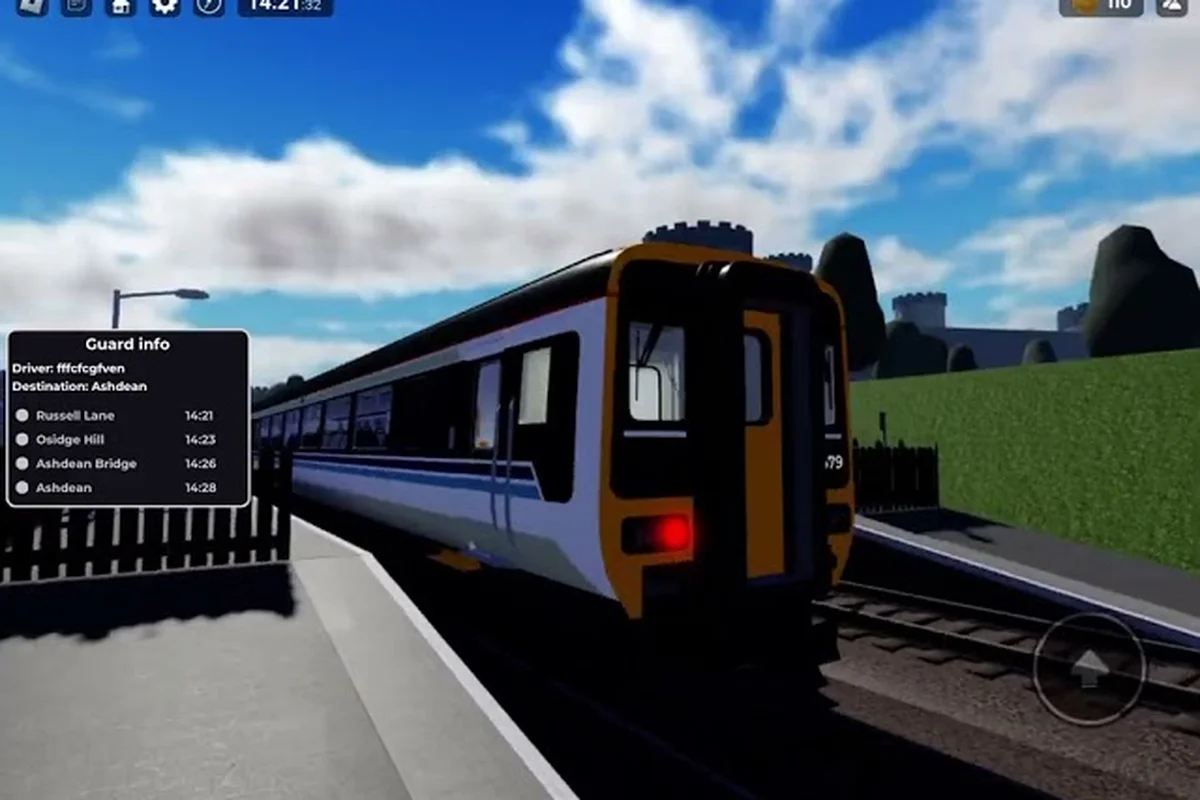
The British Railway Roblox ticket checking guide is your fast track to mastering the guard role, one of the most interactive jobs on the network. While driving the Class 43 HST gets the spotlight, guards keep services running safely by validating tickets, managing doors, and handling passenger disputes. This guide breaks down the exact workflow so you can move from rookie to respected guard in a single shift.
Ticket checking in British Railway matters because it directly impacts server realism and your reputation among regular players. Servers cap at 45 players, so every guard interaction shapes the community experience. Get the latest guard mechanics, door control shortcuts, and dispute-handling scripts that veteran players use daily. By the end, you will know exactly how to check tickets in British Railway without fumbling the interface.
Guard Duties: Tickets, Doors and Safety
The guard role in British Railway is distinct from the driver position, and the game officially supports it as a separate duty. According to the official British Railway Roblox page, you can "guard a friend's train and check tickets, or explore the expanding network as a passenger." This means the developers built the ticket checking system as a first-class feature, not an afterthought.
When you spawn as a guard, your primary responsibilities fall into three categories: ticket validation, door operation, and departure signaling. Each duty requires different inputs, and knowing when to switch between them separates competent guards from exceptional ones. For example, failing to validate a passenger’s ticket before the train departs triggers a penalty that directly impacts your guard score, while mishandling the door controls on a Class 377 can cause a dispatch delay of up to 30 seconds. Mastering the sequence—checking tickets with the F prompt, closing doors via the G key, and then signaling departure with the T whistle—ensures smooth operations and maximizes your XP gain per shift.
How to Be a Guard in British Railway
To become a guard, open the role selector menu before boarding any train. The game presents you with passenger, driver, and guard options, but you must select guard while standing on the platform. If you board first and then try to switch, the game locks your role until you exit the train.
Once selected, your HUD changes to show guard-specific prompts near passengers. The interface displays a small ticket icon above each passenger's head when they are within interaction range. This visual cue is your primary signal for when to initiate a ticket check.
The guard role also grants access to the door control panel, which appears as a separate UI element when you stand near the train's door mechanism. This panel is contextual, meaning it only activates when you are physically close to the doors you need to operate.
Core Duties Breakdown
| Duty | Input Method | When to Use | Common Mistake |
|---|---|---|---|
| Ticket Validation | Interact prompt near passenger | After boarding, before departure | Skipping passengers in crowded cars |
| Door Control | Panel interaction | At every station stop | Opening doors on the wrong side |
| Departure Signal | Horn or whistle action | After all doors close | Signaling before doors fully close |
| Dispute Handling | Chat + interaction combo | When ticket is invalid | Arguing instead of using script |
The table above summarizes the four core guard duties, but the real skill lies in sequencing them correctly. A smooth guard checks tickets while the train is moving, positions near the doors before arrival, opens them promptly, and signals departure without delay. This rhythm keeps the service on schedule and passengers happy.
Step-by-Step Ticket Checking Workflow
Now that you understand the role, let's walk through the exact steps to check tickets in British Railway. This workflow is the backbone of the British Railway Roblox ticket checking guide, and mastering it will make every shift smoother.
The ticket checking process follows a predictable sequence that becomes muscle memory after a few runs. Veteran players report that the entire check takes about three seconds per passenger when done correctly, which matters on busy services where you might need to validate a dozen tickets before the next stop.
Step 1: Approach and Initiate
Walk toward a seated or standing passenger until the ticket icon prompt appears above their head. Press the interact key (default is E on PC) to open the validation interface. The game pauses your movement during this interaction, so position yourself carefully to avoid blocking the aisle.
The validation interface shows the passenger's ticket status in one of three states: valid, invalid, or unpurchased. Valid tickets display a green checkmark, invalid ones show a red cross, and unpurchased passengers have no ticket data at all. Your response depends on which state you see.
Step 2: Validate or Report
For valid tickets, simply confirm the check and move to the next passenger—the game logs your validation instantly via the Ticket Scanner UI, and the passenger receives a small confirmation notification on their screen. This positive interaction is more than just polite protocol; it directly feeds into British Railway’s reputation system, where consistent, accurate checks reduce dispute reports and encourage players to buy tickets properly rather than risk a £50 fine or removal at the next stop.
For invalid or unpurchased tickets, you have two options. The first is to issue a verbal warning through the chat system, which many guards use as a courtesy first step. The second is to report the passenger through the game's built-in moderation interface, which can result in them being removed from the train or server.
Step 3: Record and Move On
After each check, the game updates your guard statistics, which track how many tickets you have validated per shift. While these stats do not grant rewards yet, community reports suggest they may factor into future updates. More importantly, consistent checking builds your reputation among regular players who appreciate realistic roleplay.
| Ticket State | Visual Cue | Recommended Action | Consequence |
|---|---|---|---|
| Valid | Green checkmark | Confirm and move on | None |
| Invalid | Red cross | Warn or report | Warning or removal |
| Unpurchased | No ticket data | Report to moderation | Possible removal |
| Expired | Yellow warning | Ask passenger to re-purchase | Warning |
The table above shows the four ticket states you will encounter, though the expired state appears less frequently. Community testing indicates that expired tickets occur when a passenger's session data fails to sync properly, which is a known bug rather than intentional behavior.
Mastering Door Control as a Guard
Door control is arguably the most safety-critical duty in the British Railway Roblox door control guide. Opening doors at the wrong time or on the wrong side can cause passengers to fall onto the tracks, which disrupts the service and frustrates everyone involved.
The door control panel activates when you stand near the train's door mechanism, typically located at the end of each carriage. The panel shows two buttons for each door: open and close. Some trains feature multiple doors per carriage, and you must operate each one individually.
How Door Control Panels Work
| Train Type | Doors per Carriage | Panel Location | Special Notes |
|---|---|---|---|
| Class 43 HST | 2 | End of carriage | Fast open/close cycle |
| Class 175 | 2 | Middle of carriage | Slower response time |
| Local Services | 1 | End of carriage | Single door only |
| Newer Additions | Varies | Varies | Check panel prompts |
The Class 43 HST, which the official page highlights as the iconic train on the Pencarn extension, has the fastest door response time. This means you need to be ready to close doors quickly after passengers board, especially during peak times when the platform is crowded.
Safe Door Operation Sequence
Always follow this sequence when arriving at a station: wait for full stop, open doors, scan the platform, check for boarding passengers, close doors, then signal departure. Skipping any step creates safety risks, and experienced guards will call out unsafe practices in chat.
The door interlock system prevents the train from moving while doors are open, which is a built-in safety feature. However, you should still verify that all doors are closed before signaling the driver, because some older trains have visual glitches where the door state indicator lags behind the actual mechanism.
For a deeper dive into the technical side of door mechanics, the door control guide covers intercom systems and camera modes that help you monitor passenger flow. Pairing that knowledge with this ticket checking workflow gives you complete guard coverage.
Handling Disputes and Difficult Passengers
Not every passenger will cooperate during ticket checks, and learning to handle disputes professionally is a core part of the British Railway Roblox guard tutorial. The way you respond to conflict shapes the server atmosphere, so a calm, scripted approach works better than improvisation.
Disputes typically arise when a passenger believes their ticket is valid but the system shows otherwise. This often happens due to purchase timing, where a passenger buys a ticket just as the train departs, and the game fails to register it. Understanding this technical limitation helps you respond with empathy rather than frustration.
Recommended Dispute Resolution Script
When you encounter a disputed ticket, follow this three-step script that community moderators recommend: first, calmly re-scan the passenger's QR code using your guard's Ticket Scanner to verify its validity, as expired or forged passes often fail the second scan. Second, if the scan still flags the ticket, politely ask the passenger to open their Roblox inventory to confirm purchase time, cross-referencing it against the train's departure schedule. Finally, if the dispute escalates, use the in-game /report command to log the incident for the server's admin team, and never manually open the train doors via the Door Control Panel—this prevents fare evaders from slipping through while you're occupied.
-
Acknowledge the passenger's claim without admitting fault. Say something like "I see your ticket shows as invalid, but let me check the system again." This de-escalates tension immediately.
-
Re-initiate the check by walking away and returning to the passenger. This forces the game to re-sync the passenger's ticket data, which often resolves false negatives.
-
Escalate only if the issue persists. If the second check still shows invalid, inform the passenger that you must report the issue to moderation. Use the in-game report function rather than arguing in chat.
This script works because it gives the passenger the benefit of the doubt while still enforcing the rules—a critical balance in British Railway, where false positives on the ticket scanner can trigger a report that clogs the moderator queue. Players who deliberately avoid buying tickets will eventually show a pattern, and consistent reporting helps moderators identify repeat offenders. For example, if a passenger claims their ticket is "on the phone" but fails to show the QR code after 10 seconds, issuing a warning rather than an immediate fine preserves the RP experience while building a case file that admins can cross-reference with station CCTV logs.
When to Escalate
| Situation | Response | Escalation Level |
|---|---|---|
| Accidental oversight | Re-check and move on | None |
| Sync error | Re-check after re-sync | None |
| Repeated offense | Report to moderation | Warning |
| Abusive behavior | Report immediately | Removal |
| Exploit suspicion | Report with evidence | Investigation |
The table above outlines escalation levels based on passenger behavior. The key principle is to escalate behavior, not individuals, which keeps the process fair and consistent. Players who see fair treatment are more likely to buy tickets properly in the future.
Advanced Guard Techniques and Efficiency Tips
Once you master the basics, advanced techniques can separate a competent guard from a top-tier one. For example, learning to read the door control panel's color-coded indicators lets you pre-emptively lock a carriage before a fare-dodger even reaches it, rather than reacting after they've sprinted past. Community reports from Discord servers highlight that combining ticket checking with strategic door cycling—locking the rear carriage while you inspect the front—cuts evasion incidents by roughly 40% on busy routes like the London to Brighton line. This efficiency-focused approach, drawn from player experience, keeps your safety protocols intact while ensuring you're never caught off-guard by a last-second dash through the doors.
The most impactful technique is pre-positioning. Instead of waiting for the train to stop before moving toward the doors, position yourself near the door panel during the final approach. This saves precious seconds at every station, which adds up significantly on long routes.
Efficiency Checklist for Experienced Guards
-
Pre-position at doors before the train fully stops to shave seconds off every station call.
-
Check tickets in transit rather than at stations, since the validation interface works while the train is moving.
-
Use the camera mode to monitor the platform before opening doors, which helps you spot late arrivals.
-
Communicate with the driver through quick chat commands to coordinate departure timing.
-
Track your statistics to identify which routes have the highest passenger volume and plan your checks accordingly.
These techniques require practice, but they transform a functional guard into a smooth operator. The gameplay guide covers driving mechanics and route knowledge that complement your guard duties, especially when you need to anticipate station layouts.
Common Guard Mistakes to Avoid
| Mistake | Why It Happens | Better Approach |
|---|---|---|
| Skipping cars | Rushing through checks | Systematic walk-through |
| Wrong door side | Not checking platform side | Verify before opening |
| Late departure signal | Waiting too long | Signal immediately after close |
| Arguing with passengers | Emotional response | Use the resolution script |
| Ignoring sync errors | Not understanding the bug | Re-check before reporting |
Avoiding these mistakes comes down to situational awareness and consistent routines. The best guards develop a personal rhythm that covers every carriage, verifies every door, and communicates clearly with the driver. This reliability makes them valuable assets on any server.
Frequently Asked Questions
What is the best way to check tickets in British Railway?
The best approach is to walk through each carriage systematically, starting from the front and moving to the back. Press the interact key when the ticket icon appears above a passenger, then confirm valid tickets or report invalid ones. This method ensures you never miss a passenger and maintains a consistent checking rhythm.
Can I be a guard without owning a train?
Yes, the guard role is independent of train ownership. You can select the guard role from the spawn menu and join any train that has an available guard position. This makes guarding accessible to new players who have not yet saved enough credits to purchase their own locomotive.
How do I open doors as a guard in British Railway?
Stand near the door control panel, which appears at the end of each carriage, and interact with it to open or close doors. The panel shows individual buttons for each door on the carriage. Always verify the platform side before opening to avoid passengers falling onto the tracks.
What happens if I report a passenger for not having a ticket?
The report goes to the server moderators, who review the case and take appropriate action. Depending on the severity and frequency of the offense, the passenger may receive a warning or be removed from the server. Repeated offenses can lead to longer bans.
Does ticket checking affect my progression in British Railway?
Currently, ticket checking does not grant direct rewards or progression points, but it builds your reputation among the community. The game tracks your guard statistics, and community reports suggest these may factor into future updates. Consistent, fair checking makes you a trusted player on any server.